


Music Lessons
January 2, 2023
Arpeggio Challenge - Beginner, Intermediate and Advanced
Arpeggios are a powerful tool for improving your finger coordination and musical expression. Whether you're a beginner focusing on chord clarity or an advanced player looking to expand your improvisation, these three challenges will help take your playing to the next level.
Each challenge includes a PDF, MIDI, and Guitar Pro files to guide your practice. Use the star system to track your progress and stay motivated as you master these essential exercises. Let’s dive in!
Arpeggio Challenge #1 - Beginner
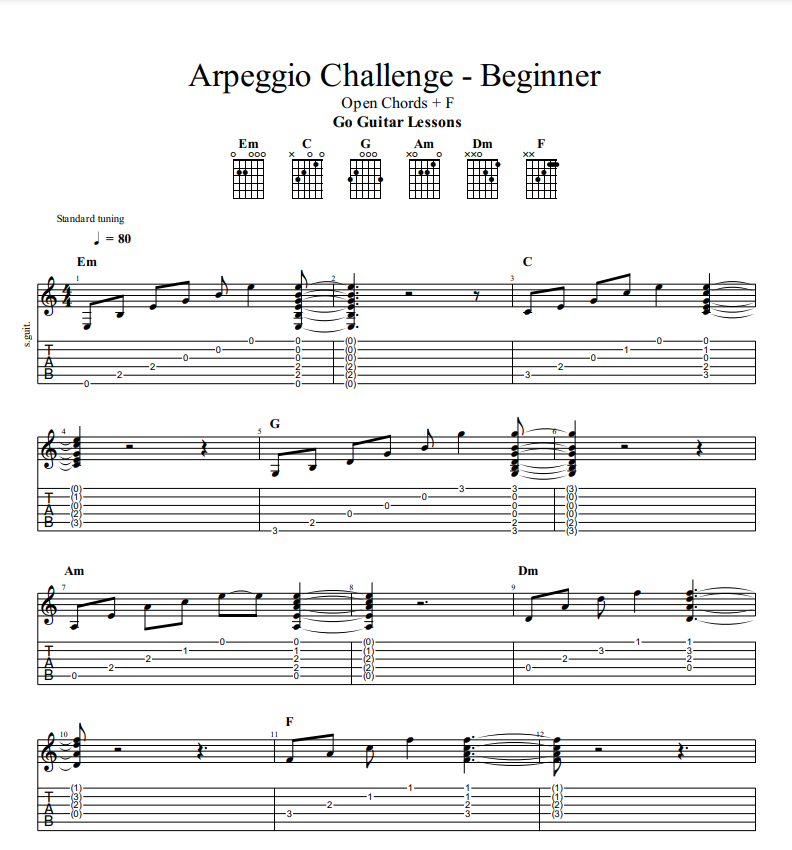
If you're a beginner learning how to play open and introductory-level chords, this challenge is a great starting point! It focuses on chord clarity by having you arpeggiate the chords and ensuring that each note rings out cleanly.
The Goal:
Your aim is to be able to play each note of the chord clearly and let it ring out. Once you've mastered this, try playing along with the MIDI audio or Guitar Pro file to see if you can change chords quickly and smoothly.
Instructions:
- Click on the TAB and download the full PDF of this challenge
- Memorize and practice the arpeggios and focusing on clarity
- Once you can do it on your own and by memory, try and play along with the midi audio (click to download) or guitar pro file (click to download) to see if you can change quickly enough and keep up.
- You can also use apps like Anytune Pro (paid) or Music Speed Changer (free) to slow down the MIDI audio. If you have Guitar Pro, use the .gp file to practice along.
Star Challenge:
Use the star system to help motive and track your progress through songs and exercises. Here is the breakdown for this exercise:
- 2 Star ** = Play 2 of the Arpeggios Clearly
- 3 Star *** = Play 4 of the Arpeggios Clearly
- 4 Star **** = Play all of the Arpeggios Clearly
- 5 Star ***** = Play all of the Arpeggios along with the Midi file or a metronome at 80bpm
Arpeggio Challenge #2 - Intermediate
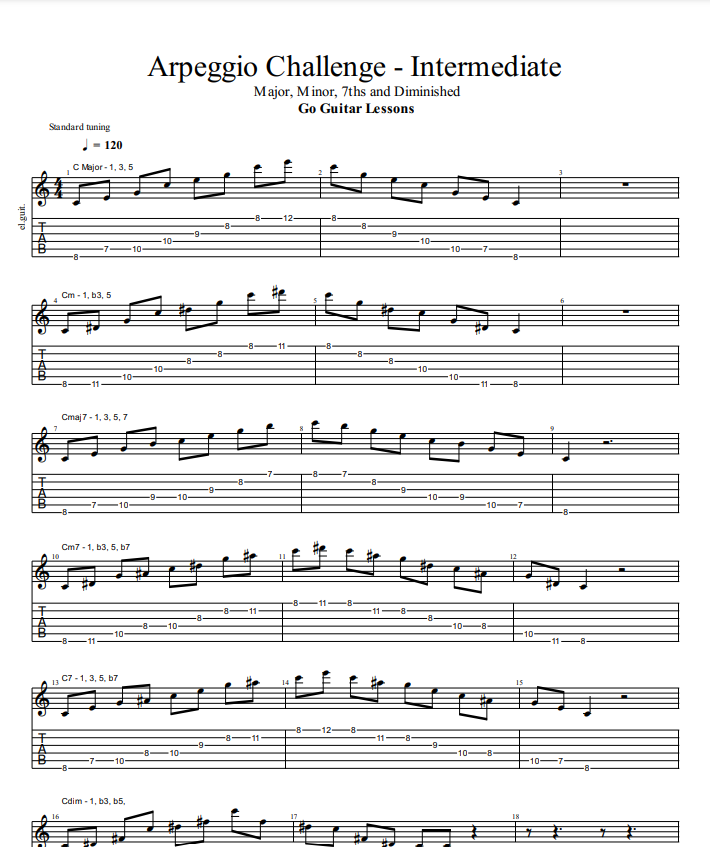
This challenge is ideal for experienced players looking to learn arpeggios across the neck. These moveable shapes form a solid foundation for all styles of music. Unlike the beginner challenge, where the notes ring out, these are "isolated note arpeggios". As you move to the next note, you'll need to kill the previous one by lifting your finger.
The Goal:
The focus is on memorizing the arpeggio patterns and being able to play them at a fast speed.
Instructions:
1. Click on the TAB and download the full PDF of this challenge
2. Memorize the arpeggio patterns forwards and backwards
3. Play along with the midi audio (click to download) or guitar pro file (click to download) or Metronome. Start at 70BPM and gradually increase until you hit 120 BPM to see if you can change quickly enough and keep up. Make sure to play all of them forwards and backwards
4. You can also use apps like Anytune Pro (paid) or Music Speed Changer (free) to slow down the MIDI audio. If you have Guitar Pro, use the .gp file to practice along.
Star Challenge:
Use the star system to help motive and track your progress through songs and exercises. Here is the breakdown for this exercise:
- 2 Star ** = Memorize 4 of the Arpeggio Patterns
- 3 Star *** = Memorize all 8 Arpeggio Patterns
- 4 Star **** = Play all Arpeggio Patterns to a Metronome or gp file at 80BPM
- 5 Star ***** = Play all Arpeggio Patterns to a Metronome at 120 BPM, or the midi, or the gp file at 120BPM
Arpeggio Challenge #3 - Advanced
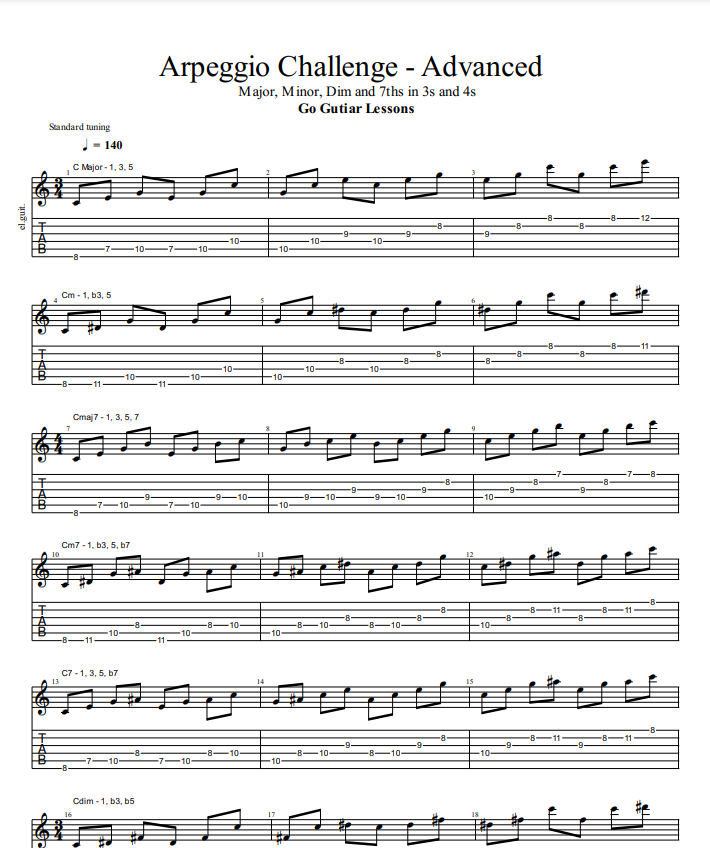
This challenge takes the intermediate arpeggios and puts them into groups of 3 and 4, testing your memory and finger placement. It will also help you break down full 6-string arpeggios into smaller, more usable subsections—perfect for improvisation, riff creation, and melodic lines.
Instructions:
- Click on the TAB and download the full PDF of this challenge
- Start by memorizing the first arpeggio, C Major.
- Set a metronome to 3/4 with beat 1 accented and start at 70 BPM for 3-note arpeggios. If playing a 4-note arpeggio, set the metronome to 4/4 with beat 1 accented.
- Gradually increase the tempo by 5 BPM at a time until you reach 120 or 140 BPM.
- You can also use apps like Anytune Pro (paid) or Music Speed Changer (free) to slow down the MIDI audio. If you have Guitar Pro, use the .gp file to practice along.
The Goal: Your aim is to be able to play all of the 3-note arpeggios in groups of 3, and all of the 4-note arpeggios in groups of 4, at a speed of 140 BPM using a metronome, the MIDI audio, or the Guitar Pro file.
Star Challenge:
Use the star system to help motive and track your progress through songs and exercises. Here is the breakdown for this exercise:
- 2 Star ** = Memorize 4 of the Arpeggio Patterns
- 3 Star *** = Memorize all 8 Arpeggio Patterns
- 4 Star **** = Play all Arpeggio Patterns to a Metronome or gp file at 80BPM
- 5 Star ***** = Play all Arpeggio Patterns to a Metronome at 120 BPM, or the midi, or the gp file at 120BPM
Conclusion: Unlock the Power of Arpeggios
By working through these arpeggio challenges, you're not just building technique—you’re expanding your musical vocabulary and unlocking new creative possibilities. Whether you're just starting out or refining advanced skills, consistent practice with arpeggios will make a noticeable difference in your playing.
Keep challenging yourself, track your progress with the star system, and don't be afraid to push your limits. The more you practice, the more fluent you’ll become in applying arpeggios to your music.
If you have any questions or want to share your progress, feel free to drop a comment below or reach out. Happy playing!
Start Your Guitar Learning Journey!
Whether you're about to begin your lessons with us or you're considering joining the Go Guitar family, we’re excited to help you or your child discover the joy of playing guitar. Our personalized, fun, and effective teaching methods are designed to meet you wherever you are in your musical journey, from classical to popular music, and from reading sheet music to mastering TAB.
For those about to start, get ready for an engaging and rewarding experience that will make learning guitar both enjoyable and effective. And if you’re still thinking about it, don’t miss the chance to bring the gift of music into your life.
Sign up for a trial lesson today and see firsthand why so many students and parents trust Go Guitar for their musical education.
Schedule Your Trial Lesson Now


.png)
.png)


